20
May
How to buy a practical bike
Last summer I gave a talk at Ignite Seattle on how to buy a practical bike. This is the slide deck for that talk. There’s no audio, but you can gather most of it from the images. The summary is below the presentation.
In general, when shopping for a bike, the best thing you can do is ride several and find one that sings to you. Details of manufacturer and parts are less relevant if you like how the bike feels when you ride it.
- At a give price point, most new bikes are going to have a similar mix and quality level of parts.
- Look for a bike where you can get the handlebar at or above the height of the seat when the seat is adjusted to your leg length.
- Low gears are critical if you live near hills or plan on carrying or pulling loads.
- You probably want at least 32mm / 1.25″ wide tires. You don’t need a suspension, or knobby offroad tires, or any tread at all, in the city.
- Your frame should have room for fenders (you can wait until September for those, but shops may install them free if you buy with your new bike).
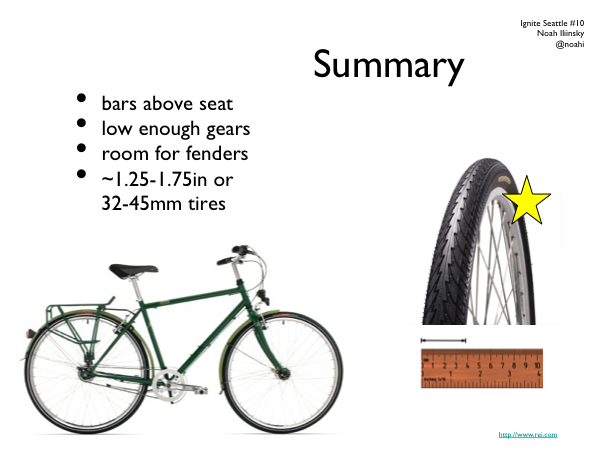
Key points when buying a practical bicycle

18
May
UIE Virtual seminar podcast
Here’s the podcast and transcript that goes with my virtual seminar on visualization for UIE. In this podcast I talk a lot about basic visualization concepts, with some good Q&A. It’s good foundational material.
16
May
Video of my sameAs talk in London
This is the video of the talk I gave at sameAs in London on March 28th. It’s about 15 minutes, and is a lighthearted look at good and bad visualization techniques and designs. The audience was about 130 geeks with pints; my slides were being controlled for me. Many thanks to @Kaythaney for inviting me to speak. Enjoy!
SameAs Meetup on Visualisation – Noah Iliinsky from Steven Allen on Vimeo.
SameAs meetup, An evening of visualisation.
Monday 28th March at The Driver, 2-4 Wharfdale Road, Kings Cross, N1 9RY London.
In this talk Noah Iliinsky
Co-author of Beautiful Visualisation.
http://oreilly.com/catalog/0636920000617
http://twitter.com/#!/noahi
Hosts
@Kaythaney & @mza
1
May
Beautiful Visualization Chapter 1: On Beauty
This is an excerpt from my chapter in Beautiful Visualization. You can download a pdf of the entire chapter.
Chapter One: On Beauty, by Noah Iliinsky
This chapter is an examination of what we mean by beauty in the context of visualization, why it’s a worthy goal to pursue, and how to get there. We’ll start with a discussion of the elements of beauty, look at some examples and counterexamples, and then focus on the critical steps to realize a beautiful visualization.
[I use the words visualization and visual interchangeably in this chapter, to refer to all types of structured representation of information. This encompasses graphs, charts, diagrams, maps, storyboards, and less formally structured illustrations.]
What is Beauty?
What do we mean when we say a visual is beautiful? Is it an aesthetic judgment, in the traditional sense of the word? It can be, but when we’re discussing visuals in this context, beauty can be considered to have four key elements, of which aesthetic judgment is only one. For a visual to qualify as beautiful, it must be aesthetically pleasing, yes, but it must also be novel, informative, and efficient.
Novel
For a visual to truly be beautiful, it must go beyond merely being a conduit for information and offer some novelty: a fresh look at the data or a format that gives readers a spark of excitement and results in a new level of understanding. Well-understood formats (e.g., scatterplots) may be accessible and effective, but for the most part they no longer have the ability to surprise or delight us. Most often, designs that delight us do so not because they were designed to be novel, but because they were designed to be effective; their novelty is a byproduct of effectively revealing some new insight about the world. keep reading…
9
Mar
Presenting in London
Come out to sameAs in London on March 28th for a night of visualization conversation.
9
Mar
Podcast with Jared Spool
Jared Spool interviewed me for Brain Sparks. It’s a 30 minute podcast; the title is Steps to Beautiful Visualizations.
Update: there’s a mostly-accurate transcript available as well.
23
Feb
Web App Master’s Tour
This year I’ll be presenting at the Web App Master’s Tour, along with many other brilliant folks. Come see us in Philadelphia March 21-22, Seattle May 23-24, or Minneapolis June 27-28.
Save $100 off the current price by using the discount code WAMT11. That plus the early bird savings is worth $300 total off of the the standard price.
I look forward to seeing you there!
3
Jan
Why Apple isn’t worried about iPad competitors
In a New York Times article entitled Rivals to the iPad Say This Is the Year, makers of would-be iPad competitors reveal their strategy. Tablet manufacturers “who have discussed their plans say they will both offer specific features that the iPad is lacking, and undercut their competitors on price.” (Emphasis mine.)
Reading this gave me a flashback to almost five years ago, when Samsung released an mp3 player that they hoped would compete with the iPod. It was a good product, and it was doomed to fail. David Pogue nailed it:
The iPod’s competitors have wasted years of opportunity by assuming that they can beat the iPod on features and price alone. They’re wrong.
In fact, at least six factors make the iPod such a hit: cool-looking hardware; a fun-to-use, variable-speed scroll wheel; an ultrasimple software menu; effortless song synchronization with Mac or Windows; seamless, rock-solid integration with an online music store (iTunes); and a universe of accessories. Mess up any aspect of the formula, and your iPod killer is doomed to market-share crumbs.
I predict that history will largely repeat itself. Apple doesn’t win because they provide more features, they win because they provide a more intentional design that results in a better experience. Many other tablets will be sold and loved (my friends love their Samsung Galaxy Tabs), but no device will present a credible threat to the iPad’s market dominance until it offers a similarly intentional, compelling, and coherent experience.
9
Dec
How to design visualizations
I posted a quick process reference called How to design good data visualizations, diagrams, and information graphics over at O’Reilly Answers.
22
Jun
Q&A on Beautiful Visualization
I was recently asked some questions about the Beautiful Visualization (O’Reilly 2010) and my role as the technical editor and chapter contributor.
How did you end up working on Beautiful Visualization?
I was given the opportunity to work on the book because of my previous research and master’s thesis on methods of creating quality information visualizations.
Why is this book especially important now?
This is a particularly exciting time to be working with information visualization.
Visualization has become popular over the last few years. There have been some very good visualizations making it into the media and pop culture recently, and they have reached millions of people. Of note, the 2008 elections and current World Cup tournament have inspired dozens of visualizations that have received a lot of attention. Good visualizations are fun, educational, and engaging. People enjoy them, and some publications such as the New York Times and GOOD magazine are becoming known for their (generally high quality) work with information visualizations.
keep reading…